The internet in your home, with an off switch.
Routersafe is a WiFi 6 router built for parents. See who's online, set bedtime and homework hours, and pause everything with one tap — from your phone.

60-second tour
See it work in one evening
Why a router, not an app
Parental-control apps have three holes. A router has none.
Apps only work on the devices you remember to install them on — and only until your kid figures them out.
They get deleted
A 12-year-old can uninstall an app, reset a phone, or borrow a friend's. Routersafe's rules live in the router - there is nothing on their screen to remove.
They miss the TV, the PlayStation and the laptop
Most apps cover phones only. Routersafe covers every device on your WiFi: smart TV, consoles, tablets, laptops, the old iPad in the drawer.
They charge every month
$5-15 a month, per family, forever. Routersafe is $198 once - hardware you own, with free updates.
Routersafe sits at the WiFi. Every device in the house follows the same rules, and there is nothing on the kid's screen to fight with.
 17:30After school
A normal Tuesday
They are home before you are.
Routersafe is already awake. You can see who is online and how much time they have left today - and stop it all with one tap, from wherever you are.
The parent app
Made for the moments parents actually have
One-handed, at 9pm, from the couch. Every screen does one job and does it in a tap.
Pause with one tap
Dinner, bedtime, 'come here now'. Tap once and their internet stops. Tap again to bring it back.
Day Strip schedule
Sleep, homework and free hours on a 24-hour strip. Pick an age and a sensible schedule is already set.
Daily time limits
1h30 on school days, more on weekends. Kids can ask for extra time; you approve with one tap.
Content filter & SafeSearch
Blocks adult and harmful sites and forces SafeSearch on Google and YouTube - on every device.
App control
Block TikTok, YouTube, Roblox or any game during homework hours. Allow them again after.
Anti-bypass
Detects VPN, proxy and encrypted-DNS tricks. When a device tries to sneak around the rules, you get told.
Activity in plain language
What each child used today and this week. 'Ben - 1h 12m, mostly YouTube.'
A WiFi network per child
Each child gets their own network. Scan a QR code to join a device.
The parent app
Three screens. That's the whole app.
Built for one hand at 9pm. No dashboards, no technical words.
HomeWho's online, how much time is left, one tap to pause.
ActivityWhat each child used today and this week, in plain language.
Content filterHarmful sites off by default. Games and social apps off during homework.
 18:00Homework
Homework hours
TikTok is off. Google Classroom still works.
Choose which apps stay open during homework and which ones do not. It applies to the laptop, the tablet and the phone at the same second.
How it works
Set up in five minutes. Then forget it's there.
No command line, no port forwarding, no manual.
Plug it in
Connect Routersafe to your modem with a cable, or let it join your existing WiFi as a repeater. Either way it is working in under five minutes.
Add your kids
Name, age, which devices are theirs. Age presets set bedtime, homework hours and daily limits for you — edit if you like, or don't.
Live your evening
Open the app from the couch. See who is online, pause at dinner, and let bedtime switch the lights off automatically.
 21:00Bedtime
Bedtime
The WiFi goes quiet on its own.
At bedtime their devices lose the internet and get it back at 06:30. No argument at the bedroom door, no phone under the pillow at midnight.
Compare
What you get, honestly compared
| Routersafe | Parental-control apps | ISP router settings | |
|---|---|---|---|
| Covers smart TV, consoles, laptops | ✓ Everything on WiFi | ✗ Phones only | ✓ Sometimes |
| Nothing to install on the child's device | ✓ | ✗ App required | ✓ |
| Can't be uninstalled or reset by the child | ✓ | ✗ | ✓ |
| Bedtime & homework schedules per child | ✓ Per child | ✓ Per device | — Basic on/off |
| Blocks VPN & DNS tricks | ✓ Built in | ✗ Rarely | ✗ |
| Pause everyone with one tap | ✓ | — Per device | ✗ Buried in menus |
| Monthly fee | ✓ $0 | ✗ $5-15 / month | ✓ $0 |
| Setup for non-technical parents | ✓ Under 5 min | ✓ Easy | ✗ Hard |
| Runs locally, no cloud account | ✓ | ✗ Cloud | ✓ |
In real homes
One router. Every screen in the house.
Same rules on the tablet, the console, the smart TV and the phone in the bedroom.


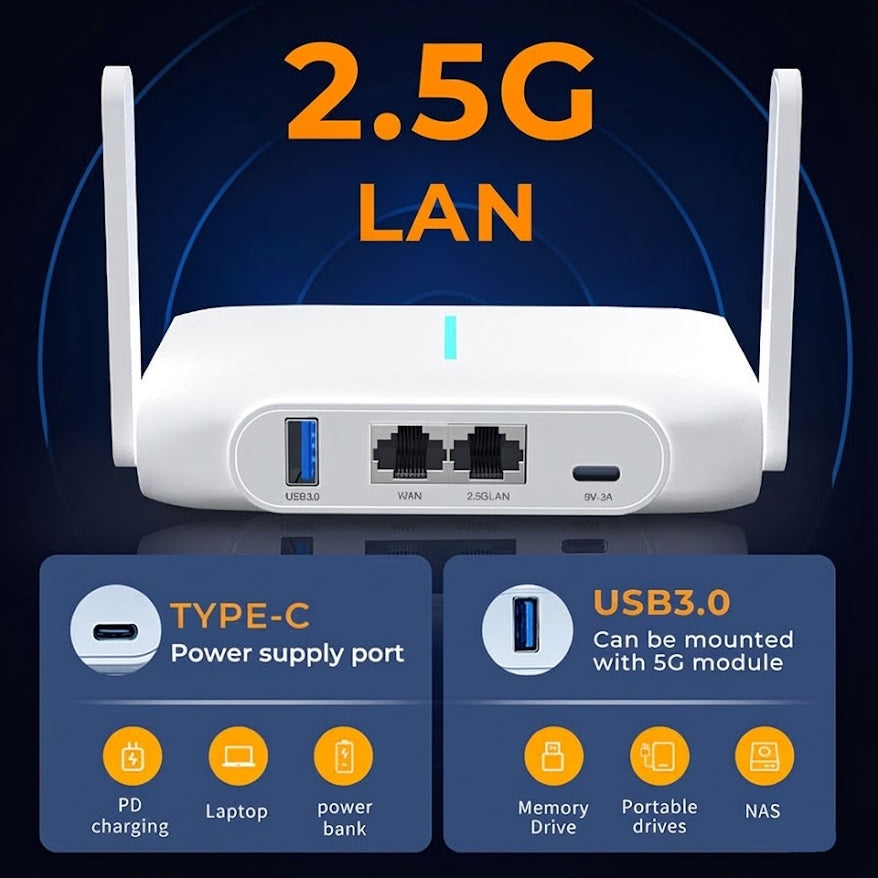
The hardware
A proper WiFi 6 router. Not a gadget.
Routersafe runs on the GenRouter H3000 — a full WiFi 6 router built for homes with a lot of devices.
- WiFi 6 (802.11ax), dual-band 2.4 GHz + 5 GHz, up to 1 Gbps
- 1× 2.5 Gbps LAN + 1× 1 Gbps WAN
- Dual-core 1.3 GHz, 1 GB RAM — up to 50 devices
- Main router or WiFi repeater — no cable required
- 22 × 12 × 4 cm, 350 g, USB-C power
- Free firmware updates
In the box: Routersafe router · USB-C cable + US power adapter · Quick setup guide
See full specsPricing
Pay once. No subscription.
One-time. Every feature included, forever.
- Full parent app — pause, schedules, limits, filters
- Every device on your WiFi, unlimited
- Free firmware updates for life
- 1-year limited warranty
- 14-day return or exchange
Ships worldwide except mainland China. Duties and taxes may apply at delivery.
Questions
Things parents ask before buying
Does Routersafe replace my current router?
It can - plug it into your modem and it becomes your home WiFi. Or keep your router and let Routersafe join it as a repeater; just put the kids' devices on the Routersafe network.
Do I need to install anything on my kids' devices?
No. The rules live in the router. Any device that joins your WiFi follows them - phones, tablets, laptops, smart TV, consoles.
What if my kid uses a VPN, or switches to mobile data?
VPN, proxy and encrypted-DNS attempts are detected and blocked on WiFi, and you are notified. Mobile data is outside any router's reach - Routersafe covers everything in the house.
Can I set different rules for each child?
Yes. Each child has their own profile, schedule, daily limit and filter level. Age presets give you a sensible starting point in one tap.
Is there a monthly fee?
No. $198 once. Firmware updates are free.
Where does my data go?
Nowhere. Routersafe runs locally in your home - no cloud account, no browsing history uploaded. The parent app talks directly to the router.
Which countries does it ship to?
Worldwide, except mainland China. Orders ship with a US wall plug; use a local adapter elsewhere.
What is the warranty?
1-year limited warranty and a 14-day return or exchange window.